The Impact of Climate Change on Coastal Ecosystems
Verify Authorship, Not Just Originality
AuthorProof integrates directly into Canvas to generate targeted comprehension quizzes from each student's submission. Students who wrote their work can answer questions about it. Students who didn't, can't.
Book a DemoPlagiarism Detection Has a Blind Spot
Plagiarism detectors and AI-writing tools analyze the document, not the student. A student can paraphrase a source, use AI to rewrite someone else's draft, or hire a ghostwriter — and pass every existing check.
AI-Generated Content
Large language models produce essays indistinguishable from student work. AI detectors can flag probability — they can't prove who wrote it.
Contract Cheating
Students can purchase or outsource assignments, submitting work they neither wrote nor understand. Similarity detection won't catch it.
Paraphrasing & Ghostwriting
Rewriting a source or having someone else draft an essay bypasses every originality check. Instructors know this — they just lack a scalable tool to act on it.
How It Works
AuthorProof lives inside Canvas — not alongside it. Four steps from setup to authorship signal.
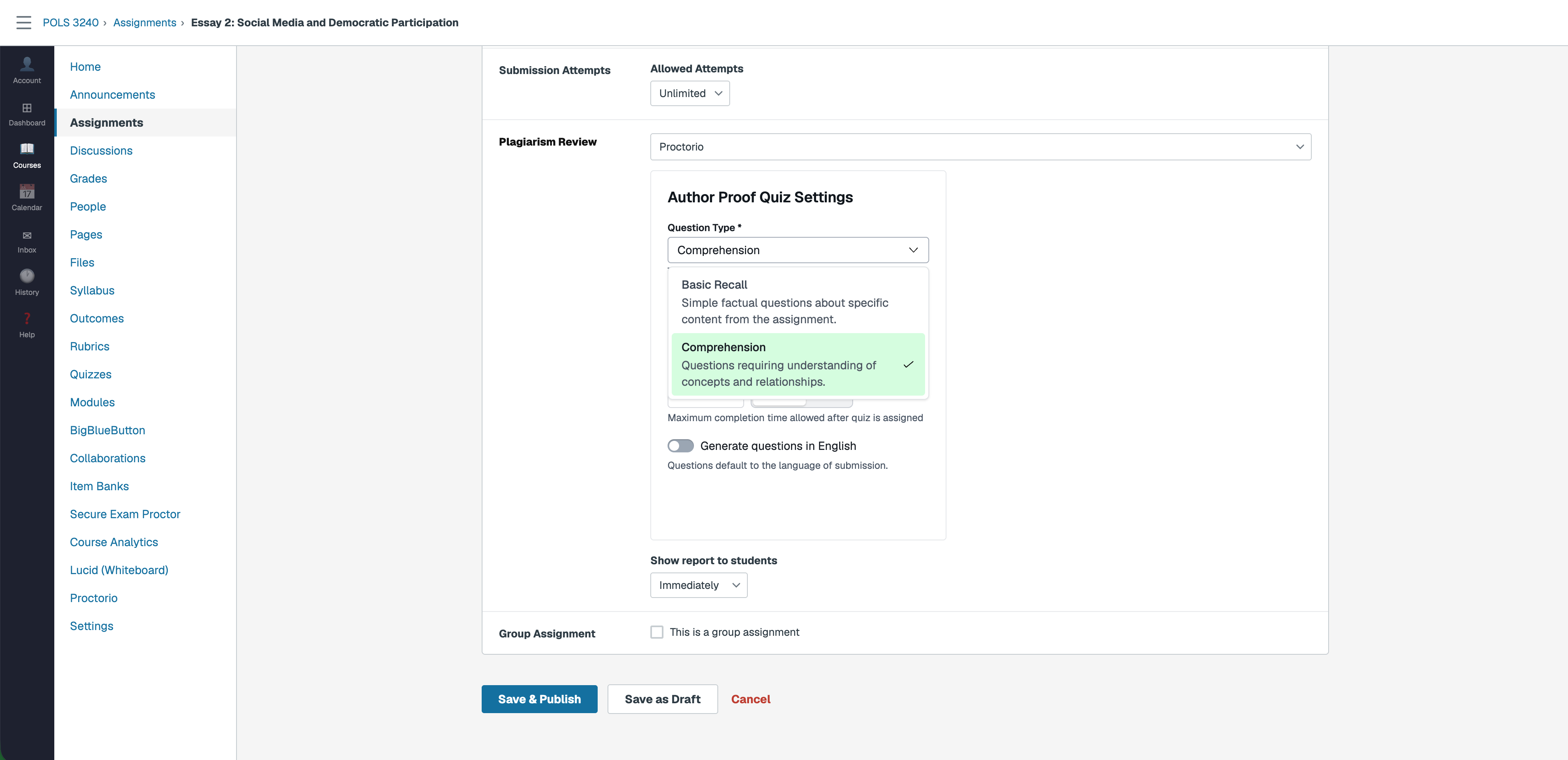
Instructor Enables AuthorProof
AuthorProof settings appear inline in the Canvas assignment editor under Plagiarism Review. No separate dashboard — configure everything where you already build assignments.
- Question Type — Basic Recall or Comprehension
- Proctored Environment — Set the lockdown level
- Completion Window — Minutes or hours to start
- Language — Match submission or force English
Student Submits, Quiz Generates in Seconds
When a student submits their written work through Canvas, AuthorProof generates a targeted comprehension quiz personalized to the specific content of that submission — automatically, in seconds.
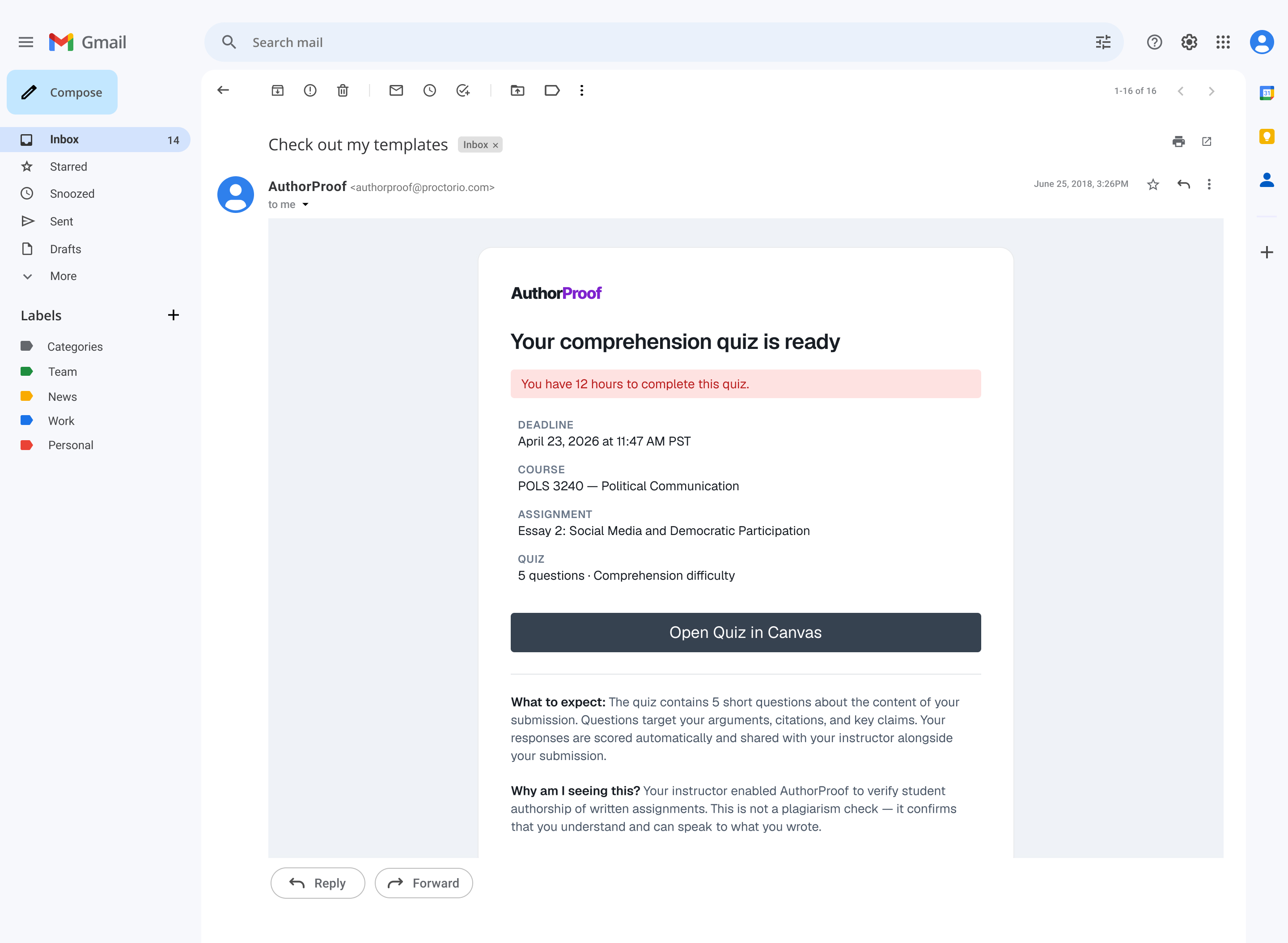
Student Completes the Quiz
An email lands in the student's inbox the moment their quiz is ready — with the deadline, course details, quiz length, and a direct link to open it in Canvas.
The quiz targets arguments, citations, and key claims from their submission. If they wrote it, they'll know the answers.
Authorship Score in SpeedGrader
The score appears as a badge on the submission in SpeedGrader. Click the badge to open the full session in Review Center — question-level results, confidence rating, and authorship detail in one place.
A Different Kind of Check
- Analyzes the document
- Compares against databases or AI probability models
- Beaten by paraphrasing, ghostwriting, or prompt engineering
- Answers: "Does this look original?"
- Assesses the student
- Generates questions only the author can answer
- Works regardless of how the content was produced
- Answers: "Did you write this?"
Built for Canvas. Built for Instructors.
Instructor-Controlled Settings
Configure question type, completion window, proctored environment, and language preferences — all inline in the Canvas assignment editor.
Multilingual by Default
Questions generate in the language of the submission automatically. Instructors can override to English while preserving cited spans in the original language.
SpeedGrader Integration
Authorship scores appear as a badge on each submission in SpeedGrader. Click through to Review Center for question-level detail and confidence ratings.
FERPA Compliant
Student submission content is not stored beyond quiz generation. No PII in logs. Designed for institutional security standards from day one.
Ready to Verify Authorship in Canvas?
See how AuthorProof can strengthen academic integrity for written assignments at your institution.
Book a Demo